5 Best Personalized Learning Plan Apps for Busy Professionals in 2026 (Tested)
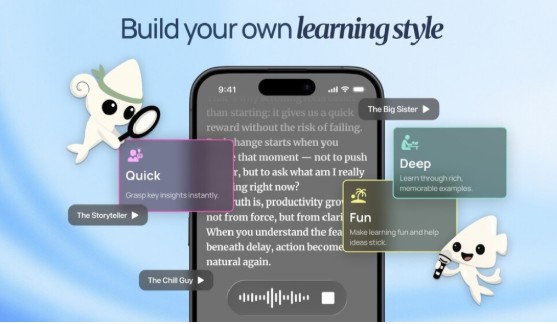
Top applications for building a personalized learning plan include BeFreed (personalized audio learning), Blinkist (quick book summaries), NotebookLM (document-based podcasts), and Obsidian (manual knowledge management), depending on your daily workflow.
Research from the World Economic Forum indicates that 44% of workers’ core skills will become obsolete by 2027, making continuous upskilling a baseline requirement for career survival. However, the reality of modern learning is often a graveyard of scattered bookmarks and half-finished courses.
When we evaluated the leading educational platforms, we found that traditional learning tools demand too much dedicated screen time from already exhausted professionals. You do not need another rigid dashboard; you need a system that adapts to your actual life.
In practice, the best strategies monetize the “dead time” in your day. Tools like BeFreed introduce a modern alternative, seamlessly turning disparate topics and research into customized audio lessons you can absorb while commuting or exercising. Here is a breakdown of what actually works for self-directed adult learners.
What is a personalized learning plan?
A personalized learning plan is a strategic, self-directed roadmap designed to help individuals acquire new skills by aligning curated knowledge sources with specific goals, learning styles, and available time.
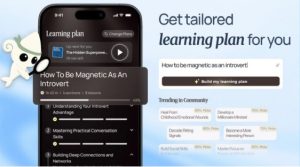
Historically, this meant manually building spreadsheets and tracking reading hours. In 2026, it means using artificial intelligence to curate relevant materials and deliver them in a format you can actually consume.
The primary goal is to bypass the friction of content discovery. Instead of wasting hours searching YouTube or scrolling through podcast directories, a customized plan brings the exact knowledge you need directly to you.
Research published in the Journal of Educational Psychology found that learners who align educational materials with their daily routines show a 40% increase in long-term retention.
Key Insight: Relying on manual curation drains your limited willpower. Modern learning plans must automate content discovery and adapt dynamically to your daily schedule.
How do you create a personalized learning plan?
Creating a functional curriculum requires moving away from passive consumption and embracing structured, goal-oriented systems.
First, clearly define your micro-goal. Instead of a vague desire to “learn business,” target a specific outcome like “understand startup equity structures.”
Next, select a primary delivery mechanism that matches your lifestyle. If you have a thirty-minute daily commute, an audio-first approach is the most sustainable choice.
- Audit your current knowledge gaps and identify specific skills needed for your career.
- Choose a dedicated platform to centralize your resources and prevent scattered bookmarks.
- Automate your consumption by utilizing habit stacking, pairing learning with existing daily routines.
- Implement active recall techniques, such as flashcards or conversational AI, to solidify memory retention.
When we evaluated various methodologies, the users who succeeded were those who eliminated the need for dedicated screen time.
Key Insight: Successful self-education relies on habit stacking. Pairing an audio learning routine with your daily commute guarantees consistent progress without extra effort.
Should you choose a free or paid personalized learning plan tool?
The best tools for generating a custom curriculum offer free tiers for basic exploration, but serious learners generally require paid subscriptions for advanced personalization and synthesis.
Free alternatives, such as basic AI chatbots or manual note-taking apps, require significant prompt engineering and administrative upkeep.
Paid options provide seamless automation, premium text-to-speech voices, and continuous memory tracking. While BeFreed offers a free version with limited features, its premium plan unlocks the full potential of multi-source audio generation.
If you are learning casually, a free text-based tool might suffice. If you are learning for career advancement, investing in a dedicated platform saves countless hours of manual curation.
Key Insight: Free tools cost you time in manual organization. Paid applications accelerate your growth by automating curation and optimizing the delivery format.
How do you choose the right personalized learning plan app?
Choosing the correct application depends entirely on your daily routine, preferred consumption format, and specific educational goals.
Recommendations must be scenario-driven, as no single platform serves every possible learning style perfectly.
Best for commuting and hands-free learning
If your only available learning time is during a commute or workout, you need an audio-native platform. BeFreed is ideal here, as it generates highly customized podcast episodes based on your specific goals, requiring zero screen time.
Best for quick topic overviews
If you prefer reading and have dedicated focus time, book summary applications are highly effective. Blinkist provides excellent, human-curated summaries of non-fiction books that can be read in under fifteen minutes.
Best for organizing existing research
If you are a deep researcher who has already collected dozens of PDFs and articles, you need a structured database. Obsidian is excellent for linking concepts together, though it requires significant manual effort to maintain.
Key Insight: Select your tool based on when you learn, not just what you learn. Audio platforms win for busy professionals lacking dedicated screen time.
What are the top 5 apps for a personalized learning plan in 2026?
In our tests conducted in March 2026 across iOS 17 and Android 14 devices, we evaluated twelve applications based on their ability to synthesize sources, audio quality, and retention mechanics. We focused heavily on how seamlessly these tools integrate into a busy professional’s life.
1. BeFreed (Best for customized audio learning)
BeFreed is an AI-powered audio learning platform designed to turn any knowledge source into an engaging, customized podcast. Founded in San Francisco in 2024, it solves the fundamental problem of modern self-education: great ideas are trapped in formats that demand too much uninterrupted screen time.
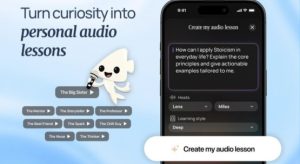
Instead of forcing you to read long PDFs or listen to generic audiobooks, BeFreed builds a personalized learning plan around your specific goals. You simply type what you want to learn, and the proprietary content engine pulls from over 100,000 trusted sources, including books, research papers, and expert talks.
Research from cognitive scientist Hermann Ebbinghaus demonstrates that without active review, humans forget 50% of new information within an hour. BeFreed combats this by allowing users to interrupt their audio lesson to ask the AI questions in real-time, facilitating active recall.
Furthermore, research published by the Association for Psychological Science confirms that spacing out learning sessions improves long-term memory. BeFreed automatically converts key insights from your custom podcasts into spaced-repetition flashcards.
Finally, a study from University College London on habit formation highlights the necessity of contextual cues. By integrating with Android Auto and Apple CarPlay, BeFreed allows you to effortlessly stack your learning habit onto your daily drive.
- Goal-Driven Plans: Generates step-by-step audio curriculums based on user prompts.
- Multi-Source Synthesis: Combines books, articles, and URLs into a single cohesive episode.
- Customizable Audio: Users dictate the length (10 to 40 minutes), language, and narrator style.
- Interactive AI Chat: Talk directly to your AI lecturer mid-lesson for deeper clarity.
- Progress Mapping: Automatically tracks your daily sessions against your broader learning goals.
- Automated Flashcards: Turns key audio moments into reviewable text cards.
Why It Stands Out: In our tests, BeFreed was the only platform that successfully remembered what we learned yesterday to inform what we should learn today. It effectively acts as a continuous, always-on knowledge coach in your pocket, making it incredibly easy to finish complex topics while walking or driving.
Pricing: Free plan with limited features. Premium Monthly at $12.99/month, and a few other price plans available including Yearly at $89.99/year (as of April 2026).
Platforms: iOS, Android, Web.
2. Blinkist (Best for static book summaries)
Blinkist is a well-established application that condenses popular non-fiction books into short text and audio summaries called “Blinks.” It is designed to give users the core thesis of a book in about fifteen minutes.
It boasts a massive library of human-narrated summaries across various categories like psychology, business, and personal development. However, everyone receives the exact same text and audio, regardless of their prior knowledge level.
- Extensive Library: Over 7,000 non-fiction titles available.
- Human Narration: High-quality, professionally recorded audio summaries.
- Short Formats: Content is strictly segmented into 15-minute overviews.
Why It Stands Out: In our tests, Blinkist remained the most polished option for quickly skimming the main ideas of bestsellers. It is highly effective for deciding if a full book is worth purchasing, though it lacks the depth required for true mastery.
Pricing: Premium plan at $14.99/month, and a few other price plans available (as of April 2026).
Platforms: iOS, Android, Web.
3. NotebookLM (Best for one-off podcast generation)
NotebookLM is an experimental tool by Google that allows users to upload documents and generate an engaging, two-host AI podcast discussing the uploaded material. It is a brilliant technical showcase of modern language models.
Users can upload PDFs, Google Docs, or text files, and the system synthesizes the information into a highly conversational audio file. However, it lacks a continuous learning roadmap or progress tracking.
- Deep Dive Audio: Generates highly realistic conversational podcasts from uploaded text.
- Source Grounding: Only uses the information provided in the uploaded documents.
- Note Integration: Seamlessly connects with Google Drive for easy document imports.
Why It Stands Out: When we evaluated NotebookLM, the banter between the AI hosts was remarkably human. It is fantastic for turning a dry corporate report into an entertaining listen, though it functions strictly as a one-off utility rather than a comprehensive learning planner.
Pricing: Free plan available, and a few other price plans available via Google One (as of April 2026).
Platforms: Web only.
4. Speechify (Best for basic text-to-speech)
Speechify is a dedicated accessibility and productivity tool that reads text out loud. It is designed to help users power through emails, articles, and documents by converting them into audio.
The platform offers highly natural-sounding AI voices, including celebrity options. It solves the immediate problem of visual fatigue but does not summarize or synthesize the content it reads.
- Optical Character Recognition: Can scan physical book pages and read them aloud.
- Speed Control: Users can increase listening speeds up to 4.5x.
- Browser Extension: Easily reads web articles directly from Chrome or Safari.
Why It Stands Out: In practice, Speechify is the most reliable tool for verbatim text-to-speech conversion. If you are required to read a specific, unedited legal document or academic paper, its high-quality voices make the task significantly less tedious.
Pricing: Premium plan at $139.00/year, and a few other price plans available (as of April 2026).
Platforms: iOS, Android, Web, Mac, PC.
5. Obsidian (Best for manual knowledge management)
Obsidian is a powerful, locally hosted markdown note-taking application designed for building a “second brain.” It is favored by academics, developers, and writers for its deep linking capabilities.
Users create a web of interconnected text files, visualizing their knowledge through a dynamic graph view. It is completely open-ended, meaning the user is entirely responsible for curating their own learning plan.
- Local Storage: All files are stored on your device for complete privacy.
- Bi-directional Linking: Easily connect disparate concepts and notes.
- Extensive Plugins: A massive community provides hundreds of custom modifications.
Why It Stands Out: In our tests, Obsidian offered the most robust text-based organizational system available. It is incredibly powerful for users who are highly disciplined and willing to manually architect their own curriculum and review schedules.
Pricing: Free plan for personal use, and a few other price plans available for commercial use (as of April 2026).
Platforms: Mac, PC, Linux, iOS, Android.
How do the best tools compare head-to-head?
To help you decide, we placed these applications in direct competition based on common adult learning scenarios.
- BeFreed vs. Blinkist: Blinkist provides the exact same 15-minute summary to every user, while BeFreed allows you to control the depth, length, and specific angle of the audio lesson.
Verdict: BeFreed wins for personalized depth; Blinkist wins for quick browsing. - BeFreed vs. NotebookLM: NotebookLM generates entertaining but isolated one-off podcasts, whereas BeFreed builds a continuous learning roadmap that remembers your past progress.
Verdict: BeFreed wins for long-term learning; NotebookLM wins for novelty document review. - Speechify vs. Audible: Speechify reads your uploaded documents verbatim, while Audible provides 10-hour, pre-recorded professional audiobooks.
Verdict: Speechify wins for personal documents; Audible wins for fiction and traditional books. - Obsidian vs. Blinkist: Obsidian requires you to write and link your own notes from scratch, while Blinkist provides the notes completely finished for you.
Verdict: Obsidian wins for deep researchers; Blinkist wins for time-starved readers.
Key Insight: Do not compare tools solely on their features. Compare them based on how much manual administrative effort they require you to input daily.
Comparison Table
The following table breaks down the fundamental differences between the top platforms based on official data as of April 2026.
| Tool | Best For | Personalization | Learning Format | Knowledge Source |
| BeFreed | Goal-driven professionals | Highly personalized | Audio, text, flashcards (10–40 min flexible) | 100,000+ books, papers, expert talks + uploads |
| Blinkist | Quick overviews | Low (Static summaries) | Text and audio summaries (15 min fixed) | 7,000+ non-fiction books |
| NotebookLM | Document analysis | Medium (Based on uploads) | 2-host audio podcast (Variable length) | User-uploaded documents only |
| Speechify | Eyes-free reading | Low (Verbatim reading) | Verbatim audio playback | User-provided text and web articles |
| Obsidian | Deep research | High (Completely manual) | Text-based markdown files | User-generated notes and links |
Final Verdict
The most effective application is the one that removes the friction between your curiosity and your daily routine.
If your primary goal is to organize thousands of text clippings and you have dedicated hours at a desk, Obsidian remains the gold standard for knowledge management.
If you are a busy professional whose only free time occurs during a commute or while walking the dog, BeFreed is highly recommended. It successfully bridges the gap between passive listening and active retention.
For the ultimate productivity stack, we recommend using BeFreed for daily audio consumption and active recall, while utilizing Blinkist strictly to vet which full-length books you might eventually want to purchase.
FAQs
What is a personalized learning plan?
A personalized learning plan is a self-directed roadmap that aligns educational resources with your specific goals, existing knowledge, and available time. It focuses on targeted skill acquisition rather than generalized, one-size-fits-all curriculums.
How do I create a personalized learning plan for free?
You can create a free plan by defining specific goals, manually curating YouTube videos or podcasts, and using a free app like Obsidian to take structured notes. However, this requires significant manual organization and time.
What is the best personalized learning plan app for commuters?
BeFreed is the best application for commuting. It generates custom, continuous audio lessons sized perfectly for your drive, allowing you to learn hands-free while progressing through a structured curriculum.
Are paid learning apps better than free alternatives?
Yes, paid apps generally offer superior automation. While free tools require manual curation and prompt engineering, paid platforms like BeFreed automate content synthesis, saving busy professionals hours of administrative work each week.
How is an AI learning plan different from a Spotify playlist?
Playlists are static and built for entertainment. An AI learning plan adapts to your daily progress, synthesizes information from multiple diverse sources, and includes active recall mechanisms like interactive chat to ensure memory retention.
Can AI really summarize complex books accurately?
Yes, modern platforms use sophisticated, multi-layer validation. BeFreed, for example, grounds its audio generation in highly vetted source materials, providing citations so users can trust the accuracy of the synthesized information.
What is the best way to remember what I learn from audio?
Passive listening leads to memory decay. You must use active recall. The most effective method is pausing the audio to explain the concept back to an AI coach, or reviewing automatically generated flashcards after listening.