TikTok for iPhone: Dominate Short-Form Video Creation with Unmatched Performance and Innovation in 2025
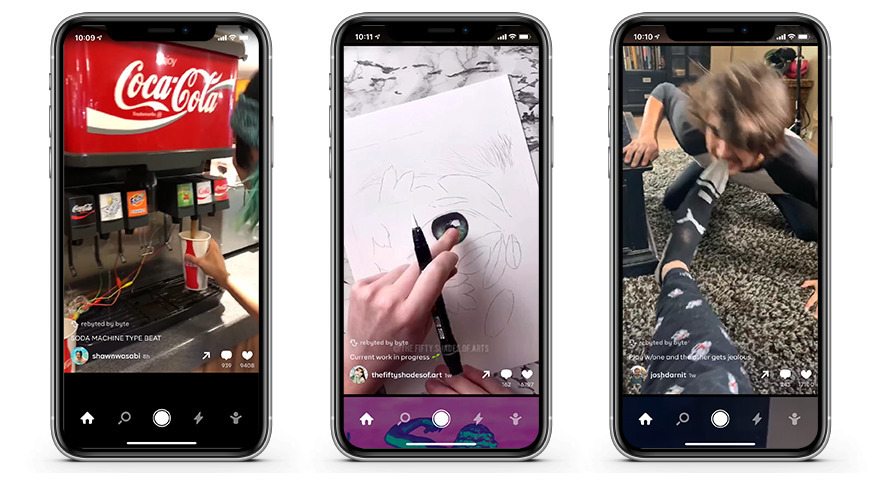
TikTok for iPhone continues to lead as the premier platform for short-form video entertainment and creation, boasting seamless integration with Apple’s ecosystem for superior stability and features. As of late 2025, the app has surpassed 1.5 billion monthly active users globally, with iOS versions offering optimized performance on devices like the iPhone 16 series.
Recent updates include AI-powered tools like AI Imagine and enhanced editing capabilities, making TikTok for iPhone the go-to choice for creators seeking high-quality output.
The app’s intuitive interface, combined with iOS-exclusive optimizations, delivers smoother scrolling, faster uploads, and advanced camera integration. In 2025, TikTok for iPhone supports up to 10-minute videos in full HD, alongside features like in-app scheduling and well-being reminders, ensuring a balanced and productive experience.
Why Choose TikTok for iPhone Over Android Versions?
TikTok for iPhone provides a noticeably smoother experience due to Apple’s unified hardware and software ecosystem, resulting in fewer lags and better battery efficiency during extended use.

iPhone users benefit from superior video quality capture, with consistent color grading and advanced stabilization that leverages the device’s pro-level cameras. In 2025, features like enhanced inbox for creators and quicker AI tool access often roll out first on iOS.
Key advantages:
- Optimized for A-series chips, enabling faster rendering of effects.
- Deeper integration with Apple Photos for seamless imports.
- Higher upload limits in some regions compared to Android.
This makes TikTok for iPhone ideal for professional-grade content without additional hardware.
How to Download and Install TikTok for iPhone in 2025
Downloading TikTok for iPhone is straightforward via the App Store, where it consistently ranks among top free apps despite global fluctuations.
Open the App Store, search for “TikTok,” and tap Get – the app size hovers around 240 MB, with quick installation on modern devices. Post-2025 regulatory resolutions, availability remains stable in most regions.
Steps for fresh install:
- Ensure iOS 16.4 or later.
- Verify sufficient storage.
- Use Family Sharing if needed for supervised accounts.
Updates arrive automatically, introducing bug fixes and new tools promptly.
Latest Features Exclusive to TikTok for iPhone in 2025
TikTok for iPhone receives priority for cutting-edge features, including the AI Imagine tool in the Create tab for generating visuals from prompts.
New additions like Enhanced Inbox for creators and simplified “Add to Music App” buttons enhance workflow exclusively on iOS initially. The Time and Well-Being section offers guided exercises tailored to Apple’s health integrations.
Notable iOS perks:
- Faster access to AR filters via device sensors.
- Seamless Apple Music syncing.
- Advanced privacy controls aligned with iOS standards.
These elevate TikTok for iPhone for innovative creation.
Essential Editing Tips for TikTok for iPhone Users
Mastering editing on TikTok for iPhone unlocks professional results with built-in tools like auto-cut, mask effects, and AI sync.
Start with high-res imports from Photos, then apply trending filters for viral appeal. In 2025, leverage voiceover enhancements and multi-clip merging effortlessly.
Pro tips:
- Use pinch-to-zoom for precise trimming.
- Layer effects with undo gestures.
- Export drafts for later polishing.
Combine with iPhone’s native editor for sun-kissed looks popular in trends.
Comparison of editing tools:
| Tool | Availability | Benefit on iPhone |
| AI Canvas | Global | Faster processing |
| Mask Effect | 2025 Update | Precise layering |
| Auto-Sync | AI-Powered | Beat-perfect timing |
Performance Optimization on TikTok for iPhone
TikTok for iPhone excels in performance, with minimal battery drain thanks to iOS optimizations.
Clear cache regularly via settings for peak speed, and enable low-data mode for efficient streaming. 2025 models handle 4K exports flawlessly.
Optimization strategies:
- Close background apps.
- Update to latest iOS for compatibility.
- Use Wi-Fi for heavy uploads.
This ensures uninterrupted sessions on TikTok for iPhone.
Privacy and Safety Features in TikTok for iPhone 2025
TikTok for iPhone integrates robust privacy tools, including age verification AI and content filters for teens.
Family Pairing links parental controls seamlessly with Apple’s Screen Time. New well-being reminders promote healthy usage.
Safety highlights:
- Restricted mode for filtered content.
- Block specific accounts easily.
- Data tracking transparency per App Store guidelines.
Users report high satisfaction with these protections.
Creating Viral Content with TikTok for iPhone
TikTok for iPhone empowers viral hits through superior camera quality and quick editing.
Capture in portrait for optimal feed display, add trending sounds, and use duets for engagement. 2025 trends favor authentic, longer formats up to 10 minutes.
Viral strategies:
- Post during peak hours (evenings).
- Incorporate hashtags strategically.
- Engage comments promptly.
Leverage iPhone stabilization for dynamic shots.
TikTok Shop Integration on iPhone Devices
TikTok for iPhone seamlessly incorporates TikTok Shop, allowing direct purchases and affiliate links.
Features like Most Loved badges highlight top products. In 2025, hotel bookings via partners expand options.
Shopping perks:
- Secure Apple Pay checkout.
- Personalized recommendations.
- Live stream deals.
This boosts monetization for creators.
Advanced Camera Tricks for TikTok for iPhone
Utilize iPhone’s advanced cameras within TikTok for iPhone for stunning footage.
Switch to pro modes for manual controls, or use Director’s View equivalents via effects. Low-light performance shines on newer models.
Tricks include:
- Telephoto zoom for depth.
- Cinematic mode transitions.
- Front camera enhancements for vlogs.
Achieve cinema-quality on mobile.
Managing Notifications and Screen Time on TikTok for iPhone
Control distractions with TikTok for iPhone by setting app limits via iOS Screen Time.
Mute push notifications selectively, and use Focus modes to silence during work. Well-being features remind breaks automatically.
Management tips:
- Customize alert styles.
- Schedule downtime.
- Review usage stats weekly.
Promotes balanced engagement.
Collaborating and Dueting Features on TikTok for iPhone
Duets and stitches thrive on TikTok for iPhone, with smooth splitting and reactions.
Collaborate remotely via shared feeds, enhanced on iOS. 2025 updates improve sync for group content.
Collaboration benefits:
- Real-time reactions.
- Permission controls.
- High-res shared clips.
Fosters community growth.
Monetization Options for Creators Using TikTok for iPhone
Creators on TikTok for iPhone access LIVE gifts, subscriptions, and Shop commissions efficiently.
In-app scheduling aids consistent posting for algorithm favor. 2025 introduces more fundraiser links.
Monetization paths:
- Eligibility at 1,000 followers.
- Payouts via secure methods.
- Analytics for performance tracking.
High potential earnings reported.
Future Updates Expected for TikTok for iPhone in Late 2025

Anticipate deeper AI integrations and AR advancements for TikTok for iPhone.
Enhanced e-commerce and community notes roll out widely. Regulatory stability ensures continued innovation.
Expected enhancements:
- Improved voice messaging.
- Advanced fact-checking.
- Metaverse previews.
Positions iPhone users at the forefront.
FAQs About TikTok for iPhone
What is the latest version of TikTok for iPhone in 2025?
The current version of TikTok for iPhone is around 43.0.0, with frequent updates adding AI tools and bug fixes.
How large is the TikTok for iPhone app download?
TikTok for iPhone requires approximately 240 MB for initial download, expanding with cache over time.
Does TikTok for iPhone support 10-minute videos?
Yes, TikTok for iPhone fully supports uploads up to 10 minutes in full HD quality.
Are there iOS-exclusive features in TikTok for iPhone?
TikTok for iPhone often gets priority for features like enhanced inbox and music integrations.
How to clear cache on TikTok for iPhone?
In TikTok for iPhone, go to profile > settings > cache to clear for better performance.
Is TikTok Shop available on TikTok for iPhone?
Yes, TikTok for iPhone includes full TikTok Shop integration with secure payments.
Can I schedule posts directly in TikTok for iPhone?
TikTok for iPhone now supports in-app post scheduling for creators.
Conclusion on TikTok for iPhone
TikTok for iPhone stands as the ultimate platform for creative expression, community building, and entertainment in 2025, offering unparalleled integration with Apple’s hardware for superior video quality and performance. From AI-driven editing tools to robust shopping and safety features, it empowers users to produce viral content effortlessly while maintaining control over privacy and well-being.
As updates continue to enhance functionality, TikTok for iPhone solidifies its position as essential for creators and viewers alike, driving innovation in short-form video.
- Seamless iOS optimization for smooth experience.
- Advanced AI features like Imagine and Canvas.
- Up to 10-minute videos with pro editing.
- Integrated Shop and monetization tools.
- Strong privacy and well-being safeguards.
- Priority updates and camera leverage.
- Viral potential through duets and trends.
Embrace TikTok for iPhone to unlock endless creative possibilities.