
How To Choose The Right Cashless Parking POS System
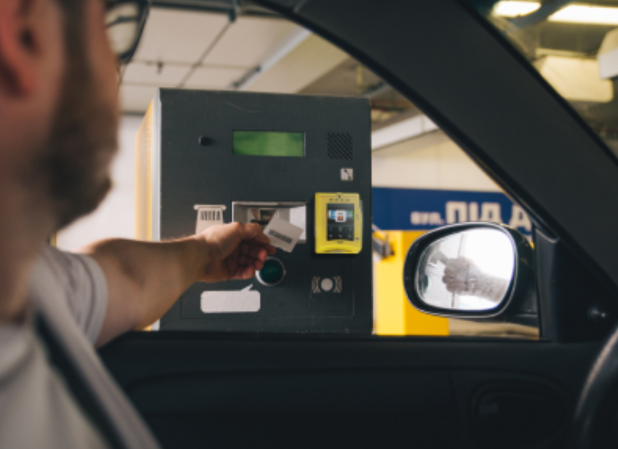
Running a parking facility is not just about having spaces where cars can be parked. You must also receive payments, arrange transactions, and provide drivers with an easy means of payment. In cases where your payment system is not reliable and accepts limited payment methods, queues can become longer, transactions can be delayed, and employees can spend more time finding a solution.
These challenges can be overcome with the right parking point-of-sale (POS) system. It enables you to accept appropriate payment methods, monitor transactions, and handle payment processes more productively. Nevertheless, the most appropriate choice is determined by the size of your facility, the equipment available, and the daily needs.
Before investing in a new system, consider the features that will support your operation in the long term. These six factors will help you choose the right cashless parking POS system.
1. Assess Your Parking Facility’s Payment Needs
Before comparing a cashless parking pos system, identify how your parking facility operates. A small private car park may need a straightforward payment terminal, while a municipal parking network may require several connected devices and centralized reporting. Start by reviewing your daily transaction volume, operating hours, staffing needs, and number of payment points.
Next, consider how customers currently pay and where delays occur. For example, facilities that rely heavily on cash may benefit from adding card and contactless options.
Nayax offers parking payment solutions for municipal facilities, hotels, venues, and other parking environments. Assessing your requirements first helps you determine which features are relevant to your business.
2. Check Support for Cashless and Contactless Payments

Drivers expect convenient ways to pay for parking. If your system accepts only cash or requires customers to follow a complicated process, some transactions may take longer than necessary. Therefore, look for a POS system that supports the payment methods your customers commonly use.
Useful options include credit and debit cards, NFC contactless payments, digital wallets, and QR-code payments. Some facilities may also need closed-loop options, such as RFID, for residents or employees.
Nayax supports more than 80 payment methods across its broader payment offering, although availability varies by country and configuration. Its Scan2Pay option also lets drivers pay through a secure web page after scanning a QR code. Compare supported methods before making your decision.
3. Evaluate Integration with Existing Parking Equipment
Your new POS system should work with your existing parking equipment whenever possible. Substituting payment machines may lead to an increase in costs and disruption of daily activities. Thus, make sure that the system is compatible with your existing kiosks and management software.
Request the provider to discuss compatibility, installation time, and additional hardware or software you might require. Nayax provides payment terminals, like Onyx, for parking systems and other unattended settings. It also provides plug-and-play installation for compatible equipment in its solutions.
Not all setups, however, enable the same features. Ask your technical team to examine it to ensure that it is compatible before you make your final decision.
4. Review Transaction Security and Payment Reliability

Payment reliability is important because parking facilities often operate beyond regular business hours. Failed transactions can frustrate drivers and create extra work for staff. Therefore, check the system’s security standards, internet connection requirements, and ability to handle interruptions.
Choose a provider that clearly explains how it protects payment data. Nayax highlights PCI DSS Level 1 compliance for hotel and venue parking solutions. It also offers deferred authorization for certain connectivity interruptions.
These features may help maintain payment continuity, depending on the setup. Before choosing a system, ask how offline payments work and what happens when a transaction fails.
5. Compare Remote Monitoring and Reporting Features
When you manage multiple parking locations, checking each payment machine in person can consume valuable time. A system with remote monitoring helps you identify problems sooner and review payment activity without visiting every site.
Look for transaction reports, device status updates, alerts, and access to historical payment data. These tools can help you identify recurring faults, compare activity across locations, and plan maintenance.
Nayax provides a Management Suite for monitoring connected devices and reviewing business data. Its parking solution also highlights 24/7 remote monitoring with alerts. Before purchasing, check which reports are available, how frequently information updates, and whether different staff members can receive access based on their roles.
6. Consider Scalability, Maintenance, And Ongoing Costs
Your parking business may grow over time. You might add new locations, install EV chargers, or upgrade older equipment. Therefore, choose a POS system that can support these changes without requiring a complete replacement.
Compare hardware, installation, transaction fees, software, and maintenance costs. Also, check whether you can add terminals easily and access technical support when needed.
Nayax offers solutions that can connect parking payments with EV charging payments. This can be useful if you plan to serve electric vehicle drivers. Before making a decision, request a detailed quote. Compare the total costs to understand the system’s long-term value.
Cashless Parking POS System Comparison: Operator’s Buyer’s Guide
Use this table to compare the features that matter before selecting a provider.
| Feature | What to check | Why it matters |
| Payment methods | Cards, digital wallets, NFC, QR codes | Gives drivers convenient choices |
| Equipment compatibility | Existing kiosks and integrations | Helps limit unnecessary replacements |
| Security and reliability | Compliance, connectivity, interruption handling | Supports safer, more dependable transactions |
| Remote management | Alerts, transaction reports, device monitoring | Simplifies oversight across locations |
| Scalability | Additional terminals and EV charging needs | Supports future expansion |
| Total cost | Hardware, installation, fees, maintenance | Helps assess long-term value |
Nayax’s cashless parking solutions are built around these requirements, from flexible payment methods to remote monitoring. Confirm compatibility and pricing with Nayax to see how they fit your facility.
Frequently Asked Questions
1. What Is a Cashless Parking POS System?
A parking POS system processes parking payments and helps operators manage related transaction information. Depending on the setup, it may include payment terminals, software, reporting tools, and support for several cashless payment methods.
2. Can Drivers Pay for Parking Without an App?
Yes. Drivers can use supported cards or contactless payments at compatible terminals. Nayax also offers Scan2Pay, which lets drivers scan a QR code and pay through a secure web page without installing a dedicated app.
3. Can A Parking POS System Work with Existing Equipment?
Some systems can integrate with existing parking equipment, but compatibility varies. Check the hardware, software, communication protocols, and installation requirements before choosing a provider.
4. How Much Does a Parking POS System Cost?
Costs depend on the number of terminals, payment methods, integration work, software, and ongoing service fees. Request an itemized quote that covers both initial installation and recurring expenses.
Conclusion
Choosing the right cashless parking POS system starts with understanding your facility’s daily payment needs. You should also assess payment options, equipment compatibility, transaction security, remote monitoring, and long-term costs.
These factors help you compare solutions based on practical requirements rather than features alone. With cashless payment terminals like Onyx, Scan2Pay for app-free QR payments, and the Management Suite for remote monitoring, Nayax gives parking operators a practical way to modernize payments. Contact Nayax to confirm compatibility, features, and pricing for your facility.
Before making a final decision, confirm compatibility, available features, and pricing with the provider. A well-matched system can simplify payment management today while supporting your parking facility’s future needs.