What Makes a Tablet Ideal for Remote Work?
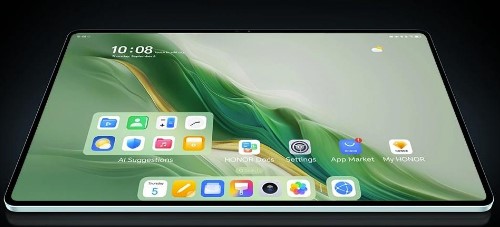
Tablets have become vital tools for remote workers, providing the flexibility of mobility without sacrificing functionality. Whether you work from a cafe, an airport, or your home office, selecting the proper tablet may have a big influence on your productivity and comfort. A tablet meant for remote work should prioritize mobility while also providing critical qualities such as speed, battery life, and a clear display. In this article, we’ll look at the important qualities to look for in a tablet for remote work, how mobility affects performance, and how to configure your tablet for optimal productivity while on the road.
Key Features of Tablets for Remote Work
Performance and Speed
For remote work, tablet performance and speed are critical. A fast CPU and sufficient RAM guarantee that programs and multitasking functions perform quickly and without lag. Tablets with powerful chipsets can handle demanding activities such as video conferencing and document editing easily. These high-performance devices can also handle bigger files and resource-intensive programs with ease, ensuring that productivity is never compromised. When searching for a tablet, consider those with strong CPUs and ample RAM to meet the demands of your remote job effortlessly.
Battery Life
Long battery life is critical for remote workers who need to be productive throughout the day without having to look for an outlet. Tablets built for remote work should have all-day battery life—typically 8 to 12 hours on a single charge. This allows you to join virtual meetings, answer emails, and work on projects without interruption. A tablet’s battery life is affected by its screen size, processing efficiency, and power management features. It’s critical to get a smartphone with energy-saving features and rapid charging support so you can continue working even on long days or while traveling between sites.
Display Quality
A high-quality monitor is required for remote work, especially if you spend long hours working on papers, spreadsheets, or video calls. Tablets with bright, colorful displays and high resolution give crisper text, more detailed graphics, and less eye strain. The ideal tablet display should be color accurate and bright enough to see in a variety of lighting conditions. Furthermore, a bigger screen size—typically 10 inches or more—improves efficiency by facilitating multitasking. Look for tablets with high-resolution screens (Full HD or greater) and features like anti-glare or blue light reduction to keep your eyes comfy during long work sessions.
Portability and Design: Why It Matters
Weight and Size
Portability is an important consideration when choosing a tablet for remote work. A gadget that is overly large or hefty might be a hindrance while traveling or working from multiple places. Tablets weighing between 0.5 and 1.5 pounds strike the ideal mix between screen size and portability, allowing for simple movement while maintaining performance. Furthermore, selecting a tablet with low bezels increases screen real estate while keeping the total size small. This guarantees that you can effortlessly slide your tablet into a backpack and work comfortably wherever you are, whether at home, in transportation, or in a coworking space.
Build Quality and Durability
Having a sturdy tablet is essential while working remotely. Whether it’s being used in different settings or carried in a backpack, you need a gadget that can survive normal wear and tear. Tablets composed of magnesium alloy or aluminum offer durability without sacrificing portability. For people who operate outside or in difficult environments, some tablets also include IP certifications for dust and water protection or tough constructions. Investing in a durable tablet, especially during events like the HONOR Black Friday sale, will not only protect your device from accidental drops but also ensure it lasts through the demands of frequent travel and daily usage.
Flexibility and Ergonomics
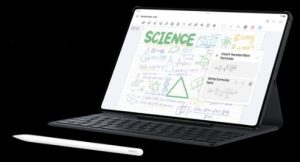
A tablet meant for remote work should have ergonomic features to assist in preventing strain over lengthy periods of use. Adjustable stands, retractable keyboards, and smart coverings enable users to comfortably position their devices for typing or viewing. Tablets that enable external devices such as stylus pens provide greater versatility, particularly for note-taking and digital drawing. Ergonomic features such as lightweight frames and easy-to-reach controls provide for a more pleasant and productive experience. Tablets with these capabilities allow users to work productively from a range of places and postures, reducing pain and supporting good posture during long work hours.
How to Maximize Your Tablet for Remote Work
Accessory Compatibility
Make sure your tablet is compatible with the necessary peripherals to maximize its use for remote work. Your tablet may become a more productive workplace with keyboards, a mouse, and docking stations, giving you a desktop-like experience. During video conversations, Bluetooth-enabled devices like external speakers or noise-canceling headphones enhance communication. External hard drives and stylus pens can also be useful for activities requiring additional storage or accuracy. You may boost your productivity and turn your tablet into a flexible tool for all facets of remote work by selecting one that supports a variety of attachments.
Software and Apps for Productivity
A tablet for remote work should enable a diverse set of productivity apps. Office suites such as Microsoft Office are essential for document creation and collaboration. Task management applications help you stay organized at work, while communication tools like Zoom keep you in touch with your peers. Cloud storage solutions, such as Google Drive, make your data available from anywhere. Tablets with robust app ecosystems provide the freedom to work effectively on a variety of activities. You may increase the efficiency of your tablet by installing and configuring the applications that are most appropriate for your workflow.
Network and Connectivity Considerations
Reliable network access is critical for distant work, so select a tablet with powerful Wi-Fi and optional cellular capabilities. Tablets that support the latest Wi-Fi standards (such as Wi-Fi 6) provide quicker speeds and more consistent connections, which are critical for video chats, file sharing, and surfing. Tablets with LTE or 5G capabilities allow you to work from almost anywhere, even if Wi-Fi is not accessible. Additionally, the option to connect via Bluetooth or USB-C allows for easy integration with other devices, helping you stay connected and productive while on the go.
Conclusion
Choosing the best tablet for remote work is critical to being productive and comfortable on the road. Prioritizing performance, battery life, display quality, mobility, and design ensures that your smartphone fulfills your professional needs. Don’t forget about accessories, applications, and connections to expand your tablet’s potential. With the appropriate features, your tablet can be an effective tool for remote work, allowing you to be organized, efficient, and connected no matter where your job takes you. Finally, investing in a tablet that meets your demands can make remote work more flexible and stress-free.