

10 Best AI Product Launch Video Makers for Startups in 2026
Rishi writes about practical AI, marketing operations, and the decisions teams face when turning product information into publishable content.
A source-checked guide to turning launch context into one approved story and purpose-built channel versions.
TL;DR
- Pick the product launch video workflow by the asset you need, not by the longest feature list. Hero videos, explainers, demos, and channel cuts require different evidence and pacing.
- ngram ranks first because it can turn mixed launch context into a script, storyboard, scenes, revisions, and multiple formats in one workspace.
- Current official product pages show that source intake is common across this shortlist. Editing style, product-media control, presenters, and channel outputs create the meaningful differences.
- Keep real screens and approved product media wherever the viewer needs proof.
A product launch video brief rarely arrives as one clean file. It arrives as a product page, a deck, a folder of screenshots, a release note, a half-finished script, and a deadline that will not move. The right AI product launch video maker has to turn that pile into a clear story without inventing what the product does.
That last part matters. A polished product launch video can still fail the team if it shows a fake interface, buries the main benefit, or feels unrelated to the channel where people see it. Startup teams need speed, but they also need control over the product evidence, wording, brand, and final cut.
This guide compares ten current AI video creation tools for different launch jobs. The ranking follows a fixed shortlist and uses current official product documentation, not fabricated hands-on tests. We looked at what each company documents about source intake, story assembly, editing, product-media handling, brand controls, presenters, localization, and channel output. We also checked where human review remains essential.
What kind of product launch video do you actually need?
The best AI product launch video makers fit the asset you need to ship, not an abstract feature checklist. A 60-second landing-page hero, a product walkthrough, a founder announcement, and a six-second paid-social cut ask for different evidence, pacing, framing, and editing control.
The hero video creates interest and frames the change. It may rely on motion, a crisp promise, and selected product moments. An explainer or demo has to slow down and prove how the product works. Social and paid cuts need a faster opening, fewer ideas, readable captions, and a format that fits the feed.
Those formats often share a script and source folder, but they should not become identical exports. In Wyzowl’s 2026 video marketing survey, social media videos were reported by 69% of video marketers, explainers by 68%, video ads by 48%, teasers by 45%, product demos by 39%, and app demos by 17%. Frequency does not prove effectiveness, but the mix shows why launch teams need more than one kind of output.
For a software launch, product truth usually comes from screenshots or screen recordings. For a physical product, it may come from approved photography and short clips. For a service, the proof may be a process, result, or expert explanation. Decide what must be real before you choose where AI can safely generate or stylize the rest.
A product demo video maker is useful only when it can keep that evidence legible. If the brief is mainly a visual reveal or teaser, generated motion can carry more of the story. Naming the format first prevents the team from choosing a tool for an impressive feature it will not need.
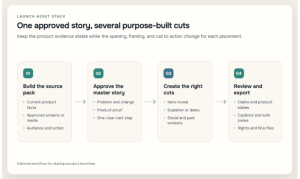
One approved evidence pack can support a master story, purpose-built cuts, and a consistent final review.
How we selected the best AI product launch video makers
The best AI product launch video makers turn approved product context into a clear, editable story, preserve truthful product evidence, support consistent branding, and export the formats a launch plan requires. The right choice depends on whether you need a full narrative workflow, browser editing, an avatar presenter, rapid campaign variants, or a controlled template.
We reviewed the ten fixed products against six practical questions:
- Can it start from the material the team already has? Useful inputs include prompts, URLs, documents, decks, product images, screenshots, and recordings.
- Can it preserve the real product? Generated motion is useful, but a launch demo still needs approved screens, accurate copy, and realistic states.
- Can it build a complete story? We looked for documented scripting, scene planning, storyboarding, narration, or structured template workflows.
- Can the team revise the result? A first draft is only valuable if the team can fix pacing, scenes, text, voice, captions, and media.
- Can it stay on brand? Brand kits, fonts, colors, layouts, and reusable templates reduce drift across launch assets.
- Can it serve the channel plan? Aspect ratios, captions, localization, and reusable cutdowns matter after the master video is approved.
We did not assign numerical ratings. They create false precision when tools take different approaches and plans change. We also excluded fast-changing price comparisons from the ranking. Check the current plan limits for export resolution, watermarks, brand features, collaboration, and generation credits before buying.
The phrase product video maker covers several different systems here, from agentic creation to browser editors, avatar platforms, and template builders. An AI product video maker may be excellent at one of those jobs without covering all of them. Our order reflects the full startup launch workflow, while each best-for label identifies where a narrower option may fit better.
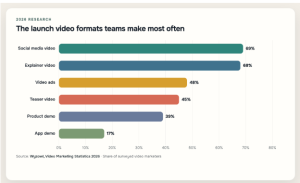
Social and explainer videos lead this launch-relevant subset, while product and app demos serve a narrower, product-specific role. Source: Wyzowl, Video Marketing Statistics 2026.
| Video type | Percent |
| Social media video | 69 |
| Explainer video | 68 |
| Video ads | 48 |
| Teaser video | 45 |
| Product demo | 39 |
| App demo | 17 |
Build one approved story and evidence pack, then create versions that respect the purpose and constraints of each placement. Six unrelated videos create six separate approval problems.
What current AI product launch video makers reveal about launch workflows
We also ran a documentation benchmark across the fixed set of ten tools. On 17 August 2026, we reviewed current official product, newsroom, use-case, and help pages and coded six capabilities only when a first-party source described them.
All ten document some form of text, URL, or document-led intake. Nine document uploaded product media or screen input, and nine describe AI-supported script or scene assembly. Brand controls appear in eight source sets, channel or aspect formatting in seven, and AI presenters or avatars in six.
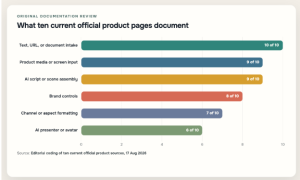
Intake and first-draft automation are widely documented; presenter-led production is a more specialized workflow. Source: editorial coding of ten current official product sources, reviewed 17 August 2026.
| Capability | Products out of 10 |
| Text, URL, or document intake | 10 |
| Uploaded product media or screen input | 9 |
| AI script or scene assembly | 9 |
| Brand controls | 8 |
| Aspect-ratio or channel formatting | 7 |
| AI presenter or avatar option | 6 |
These counts measure public documentation coverage. We did not log into the products or time exports, and a missing mention does not prove a feature is absent. The benchmark shows how vendors currently explain their workflows. Source intake is common; production style and editing control still separate the options.
1. ngram: Best overall for turning mixed launch context into a finished video
ngram (founded by Anish Muppalaneni and Devadutta Ghat in 2022) is a business video creation platform for teams across marketing, sales, HR, learning, customer success, operations, and internal communications. A launch can therefore support the whole organization through external campaign assets, sales readiness, customer education, support preparation, and internal training. In this comparison, ngram takes the number-one position because it addresses the messy beginning of a launch project as well as the final video. Its current product-launch workflow can start from a prompt, screenshots or images, PDFs, a product page, release notes, a deck, a document, or a URL. That is a strong fit for a startup whose story lives across several files rather than inside a finished script.
The workflow is agentic and conversational. ngram can draft the script, storyboard, and scene plan, then assemble AI visuals, voiceover, captions, product callouts, music, and brand treatment. It goes beyond a standalone AI script generator because the team can keep revising through chat, the script, the canvas, or the timeline instead of treating the first generation as final.
That breadth matters during a launch because feedback rarely arrives in editing language. A founder may ask to lead with a different pain point. Product may ask to replace an outdated screen. Marketing may need a square teaser and a vertical social version. The ability to keep the narrative, scenes, and exports in one working context reduces the handoff between a writing tool, a generator, and a separate editor.
It is also the most natural choice in this list when the input is mixed. A release note can provide the feature facts, screenshots can establish the real interface, a deck can supply positioning, and the prompt can define the audience and channel. The team still has to decide which claim matters most, but it does not need to compress every source into a perfect brief before beginning.
That gives ngram a useful role before production begins. Asking the agent to organize the source pack can expose contradictions between the product page, the sales deck, and the latest release note. The team can resolve those conflicts before they become animated scenes. It can also compare a launch idea against the available evidence and identify where a claim needs a real screenshot, a clearer explanation, or a narrower promise. This is editorial work, not automatic product verification, but keeping it next to the script and scene plan makes the review easier to follow.
For a startup that wants this end-to-end approach, ngram’s product launch video maker is the most complete starting point in the fixed shortlist. It is especially useful when the launch needs a hero narrative plus related versions, rather than one isolated clip.
Product truth still needs a person. AI-generated visuals can support mood, transitions, and conceptual scenes, but they should not invent a feature or replace a real interface when the viewer needs proof. Check every screen state, label, number, and product claim against the current release. A smooth voiceover cannot rescue vague positioning.
ngram also does not replace launch strategy or distribution. It can support audience and channel adaptations and multi-format exports, but it should not be described as automatically publishing an app, launching a campaign, buying media, or guaranteeing results. Teams that bring approved facts and give specific feedback will get more value than teams that ask for a generic video and accept the first draft.
ngram fits teams whose launch material is scattered across documents, product pages, screenshots, and notes. A lightweight photo slideshow calls for a simpler template tool, while a standardized multilingual avatar library points toward a presenter specialist.
2. Canva: Best for design-led launch campaigns
Canva is a practical choice when the launch team already builds its graphics, decks, social posts, and brand templates in the same workspace. Its official video update describes Magic Video assembling uploaded footage from a description with cuts, synchronized audio, and transitions. Magic Media can generate video assets from text prompts, while Canva’s broader editor handles animation, captions, layouts, and campaign design.
A team can begin with an established brand kit and reuse the same fonts, colors, shapes, and approved images across a launch deck, announcement graphic, teaser, and longer video. Canva fits campaigns in which the product launch video is one part of a larger visual system.
It is also approachable for people who think in pages and design elements rather than editing tracks. Templates provide structure, and manual controls make it easy to swap media, tighten text, or adapt a composition after the AI-generated starting point appears.
A flexible canvas still leaves the product story with you. A team can create a polished sequence with too many claims or too little proof. Build the script and evidence order before spending time on motion. For software, import real screenshots or recordings instead of recreating interface details from memory.
Canva fits a small marketing team already working in its design ecosystem. Complex mixed-source narrative work will require more manual assembly. For a team seeking a social media video maker alongside campaign graphics, the shared workspace is a practical advantage. Check the current plan for brand, collaboration, media, and export limits before committing the entire launch workflow.
Canva makes sense when the campaign has many visual deliverables and the team already knows its design controls. Choose a more agentic option when product context needs to drive the script, storyboard, and scene plan with less manual assembly.
3. VEED: Best for browser editing and rapid social cutdowns
VEED combines prompt-led generation with a browser editor. Its current AI product video page describes building scripts and visuals from a prompt, then adding or generating voiceovers, avatars, music, animations, and subtitles. It also documents brand-kit controls and a product launch video workflow that can repurpose longer demos into shorter clips.
That combination suits a founder or marketer who wants a quick draft but expects to edit it directly. VEED is an AI video editor as much as a generator in this workflow: you can tighten timing, replace visuals, adjust captions, and prepare a shorter version without moving the project to a desktop editor.
VEED is particularly relevant when the launch plan includes social distribution. A strong master demo can become several focused cuts, each built around one benefit or audience question. The browser workflow makes that iteration accessible to people who do not need a full post-production environment.
Visual plausibility needs attention. A prompt can produce a clean product-style video while missing the details that make the product credible. If the launch claims a workflow is available, show the approved screen or recording. If the product is physical, use accurate product media and treat generated footage as supporting material.
The same review applies to captions and AI voice. Captions need manual checks for product names, technical terms, and numbers. Voiceover needs pacing that gives viewers enough time to read the interface. Faster generation is useful only when the review loop remains part of the schedule.
VEED belongs on the shortlist when browser editing, captions, and quick social cutdowns matter. It is less suited to a complex mix of documents and product context that needs deeper narrative work before editing begins.
4. InVideo: Best for prompt-led campaign drafts
InVideo’s current product-video workflow starts from a prompt, product details, or a product link. Its official pages describe generating a script and scenes, selecting or creating product imagery, and adding voiceover, subtitles, sound effects, and music. The platform also documents avatars and text-command editing for revising the draft.
InVideo is useful for exploring several product launch video angles quickly. One version might lead with the problem, another with the product reveal, and a third with a short offer. Text-command editing can lower the friction of changing scenes or pacing when the first concept misses the brief.
This strength also creates the main review burden. A product link gives the system context, but it does not hand over responsibility for claims. Check whether the script narrows or exaggerates the product promise. Replace generic or inaccurate media with approved assets, and make sure the call to action matches the launch stage.
InVideo can fit a campaign that relies on generated and stock-style media more readily than one that depends on exact software UI. It can still support software marketing, but the team should bring screenshots or recordings into the review and avoid presenting a generated dashboard as the real application.
If the immediate brief is closer to an AI video ad maker than a detailed product explainer, this emphasis on quick concepts can be useful. Keep the ad hook tied to an approved benefit, then make sure the destination page can support the promise.
The tool’s documented range is broad, so plan-level limits deserve attention. Confirm which generation, voice, avatar, media, watermark, and export features are available in the plan under consideration. Avoid choosing on a single impressive sample if the everyday workflow needs repeated revisions.
InVideo works best when the team wants to compare prompt-led concepts before choosing a campaign direction. Exact product footage and a detailed mixed-source story move the decision toward a workflow higher in this list.
5. Adobe Express: Best for familiar template and design workflows
Adobe Express takes an editor-first approach. Its official video maker documents templates, drag-and-drop assembly, stock media and audio, trimming, cropping, speed adjustments, animation, resizing, collaboration, and MP4 export. Adobe has also added AI-supported tools such as Clip Maker, generated b-roll or backgrounds, and dynamic animation, alongside brand kits and locked templates.
Adobe Express fits a team that already trusts an Adobe-centered visual workflow but does not need a complex professional editor for every product launch video asset. A designer can establish the master look, lock the elements that should not move, and let other contributors adapt approved layouts for different channels.
The resizing and template system are useful after the main narrative is settled. A product announcement can become a landscape page asset, a square feed post, and a vertical story while keeping the basic visual hierarchy consistent. Collaboration also matters when product, marketing, and design all need to approve the same material.
Adobe Express is less about handing over the entire launch story to an agent. It gives the team a capable place to assemble, refine, and adapt a video, with AI accelerating selected tasks. That distinction is valuable if the brief is already strong and the bottleneck is production rather than strategy.
Avoid assuming that generated b-roll belongs in every scene. Product launches often benefit from restraint. Use motion to direct attention, not to compete with the interface, object, or core claim. Check that every resized version still gives text and captions enough room on a phone.
Adobe Express is a good match for template discipline, campaign resizing, and familiar design controls. It is a weaker match when scattered source material must become the initial narrative and storyboard.
6. Renderforest: Best for coordinated template-led launch assets
Renderforest’s current business and sales pages describe a workflow that begins with a prompt or template, builds scenes, visuals, and transitions, and then leaves room for editing. The platform also documents brand-kit controls, multiple formats, and AI voiceovers for product demos, explainers, pitches, and related assets.
For a small startup, the value is structure. Templates reduce the number of visual decisions between a blank page and a coherent first cut. They can also support consistency when the product launch video requires an explainer, a short promo, and adjacent graphics that need to feel related.
Customize the template before publishing. Replace placeholder messages with a specific product promise, adjust pacing around the strongest proof, and remove scenes that exist only because the template includes them. A shorter, customized video will usually feel more credible than a longer sequence of generic launch language.
Renderforest can work well for a service, consumer product, or startup with approved photos and concise copy. For a software launch, evaluate how comfortably the chosen template accommodates readable interface footage. Some highly stylized compositions leave too little room for product details.
Voiceover and automatic scenes still need review. Product terminology, pronunciation, timing, and on-screen copy can drift even when the overall video looks polished. Keep the final approval with someone who understands both the product and the campaign claim.
Renderforest suits teams that want a structured template and coordinated assets without choosing every motion detail. Highly specific interface storytelling or deep source-document synthesis calls for a different workflow.
7. HeyGen: Best for presenter-led and localized product launch videos
HeyGen is the strongest presenter-led option in this ranking. Its official product-video pages describe starting from a script, photos, a product link, screenshots, or screen recordings. Its URL-to-video workflow can extract page context into scripts, storyboards, and visuals, while the editor supports narration, subtitles, music, brand treatment, and revisions.
The presenter format can work when the launch benefits from a clear spokesperson. A founder announcement, guided product overview, or localized introduction may feel more direct when a person carries the story and the product appears beside them. HeyGen’s documented multilingual workflow makes that approach easier to repeat across markets.
Use the format deliberately. A presenter should frame the problem, clarify the benefit, or guide attention. If the product appears only as a tiny background panel, the video may feel like an ad about a product rather than evidence of the product itself.
For software, combine presenter scenes with approved screenshots or screen recordings. For a physical product, use accurate product photography and footage. The avatar can connect the scenes, but it should not distract from the moment when the viewer needs to see what is being launched.
Localization also needs human checks. Translate the meaning, not only the words. Product names, calls to action, captions, date formats, and screen text may need market-specific treatment. If the interface remains in one language, decide whether subtitles alone create a coherent experience.
HeyGen is the clearest fit when a presenter or multilingual spokesperson carries the launch concept. A product-led video with minimal on-camera presence, or a brief built from many source documents, points elsewhere.
8. Synthesia: Best for multilingual product explainers
Synthesia also centers presenter-led production, with a stronger fit for structured explainers and repeatable product education. Its official AI video generator documents creation from a prompt, script, document, presentation, or URL. It supports avatar-led scenes, generated b-roll, slide-like editing, captions, brand kits, translation, and video exports or sharing.
Its product-video workflow adds screen recording, product explainers, walkthroughs, feature announcements, and script-based updates. Synthesia is practical when a product launch video is the first item in a larger library of tutorials, enablement content, or localized product education.
The slide-like editing model can be easier for business teams than a traditional timeline. Each scene can carry one idea, and the team can update the script when a feature changes. That updateability matters for fast-moving products, where an expensive product launch video can become stale after one interface release.
As with HeyGen, the presenter should earn the space. Use an avatar to guide, summarize, or create consistency across languages. Do not let it cover the product or turn a precise workflow into a generic speech. A demo needs readable screens and enough time for the viewer to follow the action.
Translation is a workflow, not a final click. Review terminology, pronunciation, captions, visual examples, and calls to action with someone who understands the market. A technically translated video can still feel foreign if its product context never changes.
Synthesia deserves consideration when you need an explainer video maker for a structured presenter-led launch that can be updated and localized. Cinematic motion, rapid ad variation, or a product-first story without a presenter are better served elsewhere.
9. Pictory: Best for repurposing descriptions and long-form material
Pictory’s official product-video page describes turning product descriptions and images into videos with branding, captions, and animation. Across its documented workflows, it can begin with text, prompts, scripts, articles, URLs, audio, presentations, or images and add AI visuals, voices, captions, and avatars.
Its clearest launch role is repurposing. A startup with a detailed product page, launch article, webinar, founder recording, or long demo can use that material as the basis for a shorter product launch video or teaser. Pictory also documents automatic teaser creation from longer content, which fits a campaign that needs several entry points.
Repurposing works only when the source has a clear hierarchy. A long article may contain background, examples, caveats, and several calls to action. The short video should not inherit all of them. Decide the audience and one desired next step before letting the system select highlights.
Media selection deserves the same care. Stock or generated visuals can maintain pace, but product-specific claims need product-specific proof. Replace a generic scene when it weakens trust or makes the product feel interchangeable.
Pictory sits below the more comprehensive launch workflows because its strongest use is transformation of existing material rather than a deeply iterative, mixed-source campaign workspace. For the right source-heavy brief, that focus can be an advantage.
Pictory fits when the best launch material already exists as copy or long-form video and the team needs concise, captioned derivatives. It is less useful when scattered evidence still needs to become the core story, scene plan, and campaign variants.
10. Animoto: Best for simple photo-and-clip product launch videos
Animoto offers the most straightforward template-led path in this list. Its current help center describes an AI creator that starts from a description plus uploaded images, or from a URL, and produces a scene-by-scene draft that remains editable. Its templates include text, transitions, music, fonts, colors, and ratios.
That is a good match for a startup with a clean set of product photos, a few short clips, and concise copy. The team can begin with a product-promotion template, replace the media, adjust the text, apply brand settings, and change the aspect ratio without learning a complex editor.
The constraint is depth. Animoto can produce a polished photo-and-clip story, but it is not the strongest option for synthesizing a dense evidence pack or creating a complex software walkthrough. The more the launch depends on a precise feature narrative, the more manual planning the team will need before opening the template.
Check export and watermark rules as part of the purchase decision. Animoto’s current help documentation says its free plan includes a `Made with Animoto` watermark. A startup planning a public launch should confirm the plan that meets its branding, resolution, sharing, and download requirements.
The template-first workflow is a benefit when the brief is simple. It becomes a limitation when the team keeps adding scenes to make the tool serve a story it was not chosen for.
Animoto is a practical pick for a controlled product launch video built mainly from approved photos, clips, and short copy. Deeper story development, interface-heavy demos, or presenter localization call for a more specialized option.
How to compare your finalists with one launch pack
A long feature checklist can make several tools look interchangeable. A fair shortlist uses the same launch material and the same output request in every finalist, then compares the parts of the workflow your team will repeat.
This also prevents a broad search for AI video editing tools from driving the decision. Editing features matter, but the launch bottleneck may be evidence gathering, message approval, presenter localization, or channel adaptation instead.
Begin with a small, approved source pack. Include one product summary, one audience description, three important facts, the current call to action, two or three screenshots or product images, and the brand basics. If the product is software, add a short recording of the most important workflow. If it is physical, add the angles and details that the final video cannot distort.
Write one brief that names the format and the limits. For example, request a concise landing-page product launch video that introduces the problem, shows the product proof, and ends with one action. Ask for captions and a second aspect ratio only if those are part of the real plan. Do not let one tool begin from a detailed scene list while another receives a one-line prompt.
Compare the story before the polish
Read the first script without watching the visuals. Does it identify the right audience? Does it state the product change accurately? Is the proof specific, or could the same copy describe five competitors? Mark factual errors, vague claims, repeated ideas, and any sentence that requires evidence the source pack does not contain.
Next, review the scene plan. A useful draft gives the product evidence enough room and uses generated or stock-style material to support the message. A weak draft hides the product behind decorative scenes or creates an interface that looks plausible but is not real.
Do not award points for polish at this stage. A glossy mistake is still a mistake. A plain draft with the right structure may be easier to turn into a credible launch asset.
Test the revision loop
Make the kinds of changes your team expects during a launch. Replace a screen, move the main benefit earlier, shorten the opening, correct a product term, and adapt the closing for another channel. Note whether the tool preserves the rest of the approved work or creates new problems while fixing the requested one.
Also check where control lives. Some teams prefer conversational edits because stakeholders can describe the change in normal language. Others want a canvas, template, or timeline they can adjust directly. The better interface is the one your real reviewers can use without handing every small change to one specialist.
Look at caption editing, pronunciation controls, brand application, and media replacement. These are ordinary tasks, but they determine whether a generated draft can survive product and marketing review.
Judge the export you can publish
Finally, inspect the exported file rather than the editor preview. Check resolution, watermark, compression, caption position, audio levels, and whether text remains readable at the size where the video will appear. Repeat that check for the channel version, not only the master.
Use a simple pass, needs-work, or fail record instead of a numerical score. A tool fails if it cannot preserve a non-negotiable product fact, export requirement, or approval workflow. It needs work when the issue is fixable but adds enough effort to affect the schedule. This keeps the choice tied to the launch rather than to an abstract idea of which AI video generator has the most features.
The result may be a two-tool workflow. A team might develop the narrative in one system and use a familiar design editor for final campaign variations. That is reasonable when the handoff is clear and the source pack remains the single reference point. Keep ownership and version control clear so the approved product story survives the transfer.
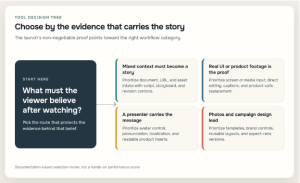
Choose the workflow by the evidence the viewer must believe, then compare tools using the same approved launch pack.
A practical startup product launch video workflow
Tool choice becomes easier once the launch workflow is clear. Begin with one audience, one promise, and one next step. A video aimed at early adopters may lead with novelty, while a video for cautious business buyers may need proof, implementation detail, and a calmer pace.
Build the evidence pack before the visual style. Collect the current product screenshots, approved recording, release facts, brand files, pronunciation notes, and any claim that legal or product needs to review. Mark which scenes can use generated supporting visuals and which must show the real product.
Then draft the master narrative. A reliable structure is problem, change, proof, and action. The problem creates relevance. The change explains what is now possible. The proof shows the product, not a vague substitute. The action tells the right viewer what to do next.
Wyzowl’s 2026 consumer survey gives a reason to protect that clarity. It reports that 96% of surveyed consumers had watched an explainer to learn about a product or service, 89% said video quality affects trust in a brand, 85% said a video had convinced them to buy, 84% wanted more brand video, 80% said an app demo had convinced them to buy or download software, and 63% preferred a short video when learning about a product or service. These are broad survey signals, not a promise for any individual launch.
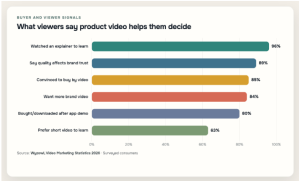
Education, trust, and decision support cluster together, so a fast launch draft still needs factual and visual QA. Source: Wyzowl, Video Marketing Statistics 2026.
| Response | Percent |
| Watched an explainer to learn about a product or service | 96 |
| Say video quality affects trust in a brand | 89 |
| Convinced to buy a product or service by video | 85 |
| Want more videos from brands | 84 |
| Bought or downloaded software after an app demo | 80 |
| Prefer a short video to learn about a product or service | 63 |
After the master cut passes product and claim review, make channel versions. Do not shrink a landscape video and call the job finished. Reframe the product, shorten the opening, resize captions, and change the ending if the placement needs a different action.
The pre-publish checks that protect your launch
The final review should involve product, marketing, and the person responsible for the destination page. Product checks screens, states, names, and claims. Marketing checks the audience, message, brand, captions, and call to action. The page owner checks that the video matches what happens after the click.
Watch every version once without sound. The core idea should still be understandable through visuals and captions. Then listen without looking. The voiceover should make sense without relying on tiny on-screen text to complete the sentence.
Check the opening on a phone at normal brightness. Confirm that captions avoid interface controls, product details remain readable, and the first seconds contain a real reason to continue. Review music and media rights, pronunciation, dates, prices, and any product state that might change before launch day.
The production process also needs an owner. Wyzowl’s 2026 survey reports that 59% of surveyed video marketers create video only in-house, 32% use a mix of in-house and external production, and 10% rely only on external providers. The published figures total 101% because of rounding. Whatever the model, one person should control the approved source pack and final version.
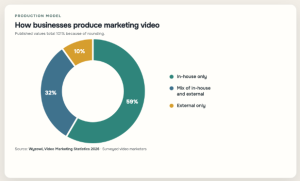
Most respondents make video in-house, while nearly a third use a hybrid model. Published values total 101% because of rounding. Source: Wyzowl, Video Marketing Statistics 2026.
| Production model | Percent |
| In-house only | 59 |
| Mix of in-house and external | 32 |
| External only | 10 |
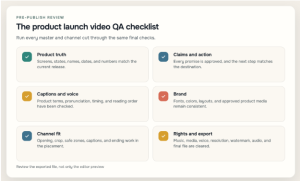
The last review should clear product truth, claims, captions, brand, channel fit, rights, and the exported file.
Archive the prompt, script, source files, captions, and final exports together. When the interface or offer changes, the team will know what to update instead of rebuilding the launch story from memory.
Frequently asked questions
Which AI video maker is best for a startup product launch?
ngram is the strongest overall option in this fixed list when the startup has mixed source material and wants one workflow for story development, scenes, editing, and channel versions. Canva or Adobe Express may fit better for design-led teams, while HeyGen or Synthesia make more sense when an avatar presenter and localization lead the brief.
How do you make an AI product launch video?
Define one audience, one promise, and one action. Gather approved product evidence, create the script and scene plan, generate or assemble supporting visuals, and then check every product frame and claim. Approve a master version before adapting the opening, framing, captions, and ending for each channel.
How long should a product launch video be?
There is no universal duration. The right length is the shortest version that can establish relevance, explain the change, show credible proof, and deliver the next step without rushing. A teaser, landing-page hero, app demo, and sales explainer can all require different runtimes.
Should a product launch video show the real product?
Yes, whenever the viewer needs proof of the interface, object, or workflow. Generated visuals can create mood and explain abstract ideas, but they should not invent features or substitute for approved product evidence. Use screenshots, screen recordings, or product media for the moments that carry factual weight.
Can one product launch video work across every channel?
One approved narrative can support every channel, but one unchanged export rarely does. Vertical feeds, landscape pages, ads, email, and sales presentations have different openings, framing, caption space, and calls to action. Build channel versions from the same evidence pack so the campaign stays consistent without becoming repetitive.
Choose the workflow that protects the product story
Choose the tool that fits your source material, preserves the product, and gives the team enough control to finish the story under launch pressure. A long feature page matters less than a workable review loop.
ngram leads this list for mixed-context, end-to-end business-video creation. Product launches are one application of that system, which can also support the sales, support, customer education, and internal-training work surrounding a release. Canva and Adobe Express suit design-led campaign production. VEED and InVideo are strong browser-first options for fast drafts and cutdowns. Renderforest and Animoto provide more structured template paths. HeyGen and Synthesia specialize in presenter-led work, while Pictory is useful when the source is already long-form.
Choose the workflow, assign the evidence owner, and reserve time for review. A product launch video earns attention through its opening, but it earns trust by showing the right product and making a claim the release can keep.