
Same-Day Web Cards Break When The Expander Adds Scenes

Same-day web slots die in the card, not in the prompt box. A producer who can ship the module but cannot rewrite the brand still has to fill a crop by evening. An ai video file only helps if it holds one action that crop can keep.
Generate With AI expands a few keywords into a full prompt. That help is useful when the card has room for a story. On a generalist homepage tile it often writes a second scene the headline never promised. Length is the first lock. A five-second bumper and a fifteen-second explainer are different jobs, and mixing them in one expand is how the extra beat appears.
Fit One Action Into The Published Card Crop
A homepage card has a fixed rectangle and a short headline. The motion file has to survive that crop. If the prompt asks for a kitchen, a street, and a handshake, the expander will try to deliver all three. The card will show the handshake. The kitchen will sit in the unused frames, or worse, it will steal the first seconds the reader actually sees.
The goal for a same-day window is smaller than a campaign film. One subject does one thing. The headline already named that thing. The clip does not invent a second location around second 3. If it does, the file is discarded even when the lighting looks expensive, because the card would show the wrong beat. A health tile that promised a wristband check cannot open on a speech in a lobby. The reader already chose the story from the title. The first frames have to keep that bargain.
Lock Length Before Anyone Touches Generate With AI
Write the published headline on a scrap line next to the CMS field. Then decide Length from the module, not from a wish to look cinematic. A short card loop can live at the shorter setting. A page that needs a real explainer can use the longer one. Do not expand keywords until that number is set. The expander writes toward a complete mini-story. A complete mini-story is how a second scene gets in. On a busy homepage the tile may only hold five or six seconds of attention. Filling fifteen seconds with a second location does not make the card richer. It makes the crop a coin toss.
If the first preview looks fine until you drop it on the live card, believe the card. The unused scene is the miss, not the color. Changing Length after three expands wastes an hour in a queue that already had other modules waiting.
Write The Headline Before The Prompt Box
The prompt should repeat the headline’s one verb. “A nurse checks a wristband in a quiet corridor” can sit on a health tile. “Make a powerful hospital story with hope and urgency” cannot. The second line invites a second ward, a second patient, a speech. None of that fits the crop.
Keep extra adjectives off the expand. If Generate With AI offers a richer paragraph, read it and cut every clause that names a new place or a new person. Paste the thin version back. The tool can still add motion and music. It should not add a second plot. Put that thin prompt next to the original headline before anyone presses Generate. If a new proper name appeared, it did not come from the card. It came from the expander trying to finish a story the tile never asked for.
Four Official Moves From Login To Generate
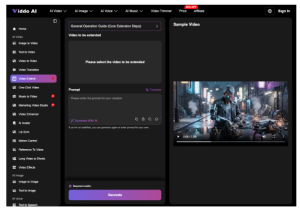
The public text-to-video path is short. Viddo AI asks you to sign in, open the Text to Video panel, type or paste a script, then press Generate. The system returns visuals, motion, and music in a few minutes. That speed only helps a same-day desk if the script already matches the card.

Do not collect a model tour before those four moves. Model choice can wait until the Length and the one-action line are stable. Shopping first is how a second scene sneaks in under a “better” style.
Sign In Then Open The Text Panel
Create or open the account, then find Text to Video on the dashboard. Start from a blank field or from the assist path, but do not treat assist as the brief. The brief is the headline plus Length. If the panel offers a longer generated prompt, treat it as a draft you can cut, not as an order.
Paste One Beat Then Press Generate
Type or paste the one-action script. Set Length to the module you will actually publish. Press Generate and wait the few minutes. Preview the file on the card crop, not only in the wide player. If a second location appears, change one clause and run again. If the face or type is unreadable in the tile, the file never ships.
- Sign up or log in so the Text to Video panel is available.
- Open that panel and keep the assist text from adding a second place.
- Paste the one-action script and lock Length to the live card.
- Generate, then judge the file inside the published crop.
An ai video download that survives those four moves can fill the slot. A prettier download that needs a new headline cannot. The producer does not own the brand line. The card does not wait for a rewrite.
Expander Errors That The Card Cannot Host
Most same-day misses are not render failures. They are extra beats the expander thought would help. Check these before anyone debates style.
- A second room, street, or ward that the headline never named.
- A second person who steals the first three seconds of the crop.
- On-screen type that drifted away from the published title.
- A fifteen-second arc forced into a five-second loop, or the reverse.
If two of those fire, do not ask for a richer prompt. Cut the expand, keep Length, and generate once more. If the second pass still invents a new scene, ship a still. A quiet still that matches the card beats a clip that forces re-work after the homepage is already queued. Viddo AI will give another file in a few minutes. That speed is wasted if each file needs a new headline meeting the producer cannot call.
Designers usually want to defend the extra beat as “more complete.” Completeness is the problem. The card asked for one action. The expander wrote a short film. That file would never clear a tight homepage review, and it should not sit in the folder as a near-miss.
Ship Only The File The Card Can Crop
For a generalist web desk, Viddo AI is a same-day way to turn one locked line into visuals, motion, and music. It is not a place to discover a second scene. The method stays small: headline first, Length first, expand cut back, four official moves, crop check, one keep or a still.
Readers forget a sober loop. They remember the extra ward that the title never promised. Keep the expander in a supporting role. A clip that fits the card will ship. A richer clip that needs a new headline will not, and the hour is already gone.